
Sign in to Overleaf
Sign in through CMC single sign-on and your Overleaf account picks up the campus Overleaf Commons features automatically. Nothing to install, nothing to buy, and no license key to enter.
The first time you sign in, Overleaf sees your CMC address as new and asks what to do with it. Pick the button that matches your situation:
You already have an Overleaf account under a different email address. You are already signed in on the CMC side by the time you reach this screen; Log in and link asks for that other account's credentials and links it to your CMC account, so your existing projects come with you. This screen is the only place the link can be made.
You have never used Overleaf, or you would rather keep a personal account separate from your CMC one. Overleaf builds a new account on your CMC address.
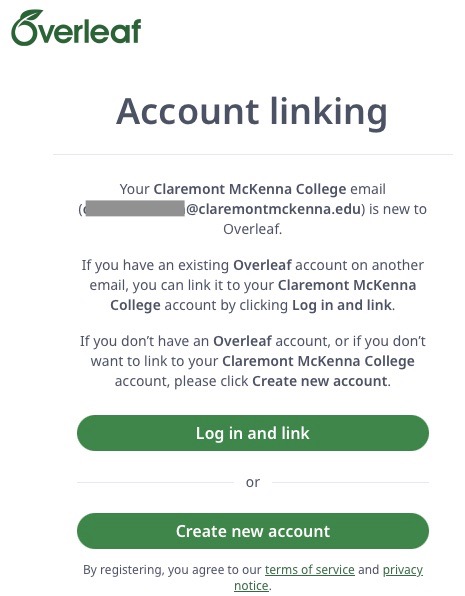
Linking runs in one direction only: signing in through CMC pulls an existing Overleaf account in under the campus license. There is no setting inside your own account that pushes it to CMC. So start from the button below rather than the generic overleaf.com sign-in — signing in there with your existing account leaves it exactly as it was. Arriving through CMC is what attaches the license. Do not purchase a personal Overleaf subscription.
Log in now with SSO ↗Launching September 2026
CMC has licensed Overleaf campus-wide at the Overleaf Commons tier for students, faculty, and staff. Sign-in opens in September 2026. If the SSO link above does not recognize you yet, the connection is still being switched on — watch ITS News for the announcement.
Overview
Overleaf is a LaTeX editor that runs in your browser. You write LaTeX on one side of the screen and see the typeset PDF on the other, with nothing to install and no local TeX distribution to maintain. It is built for the documents LaTeX is good at — theses, dissertations, journal articles, problem sets, and anything heavy with equations, figures, cross-references, or a bibliography.
The point of a shared editor is that several people can work in one document at once. Advisors and co-authors edit and comment in real time, track changes shows who altered what, and full version history lets you compare or roll back to any earlier state. That removes the usual LaTeX collaboration problem: emailing .tex files around and reconciling versions by hand.
CMC's license is the Overleaf Commons tier, which extends premium features to everyone at the college rather than to a purchased list of seats. Newcomers can start in the visual editor, which behaves more like a word processor, and move to the LaTeX source view as they get comfortable.
What Overleaf Commons Includes
- Premium features campus-wide — longer compile times than the free tier, unlimited collaborators per project, track changes, and full version history.
- Real-time collaboration — several authors editing one document at once, with comments and per-author change tracking.
- Template library — thousands of templates, including journal and conference formats and thesis layouts.
- Visual and source editing — a word-processor-style view for people new to LaTeX, and the raw
.texsource for people who prefer it. - Integrations — GitHub for version control, Dropbox for file sync, and reference managers including Zotero and Mendeley.
- A CMC portal and admin metrics — a branded entry point for the college, and usage reporting for ITS.
Getting Your CMC Account
Sign in with CMC single sign-on
Use the Log in now with SSO button above. Overleaf hands you to CMC to authenticate, then upgrades the account it links to. Do not buy a personal subscription — the campus license already covers you.
Already have an Overleaf account?
Link it by starting at the Log in now with SSO button and choosing Log in and link on the screen that follows. That is the only direction linking works — the campus license pulls your account in when you arrive through CMC, and nothing inside your existing account can hand it to the college. An account already registered to your CMC email address picks up the institutional features on that first SSO sign-in. An account under a personal address keeps its own projects; contact the Help Desk if you want a hand moving work across.
Bring an existing project with you
Choose New Project → Upload Project and drop in a .zip of a project you have been building locally in TeXShop, MiKTeX, or TeXstudio. Overleaf compiles it in place; see the import FAQ below if a package is missing.
Quick Start Guide
Overleaf's own getting-started material is good, so there is little point in rewriting it here. These are the resources worth opening first, grouped by what you are trying to do. Questions about the CMC license rather than the product go to the Help Desk.
Try the editor with its built-in tutorial
Open a quick-start project and a short walkthrough introduces the main features as you go. It is the fastest way to find out whether LaTeX suits how you write.
Create a new paper — opens overleaf.com in a new tabBrowse the template gallery
Start from something that already has the structure you need — a thesis, a lab report, a set of lecture slides — rather than from an empty file. A few worth a look are listed further down this page.
Go to the template gallery — opens overleaf.com in a new tabTake the free LaTeX course
Overleaf's free online introduction covers the essentials from scratch, and works as a refresher if it has been a few years since you last set a document in LaTeX.
Teach me LaTeX! — opens overleaf.com in a new tabFind a journal template
Overleaf's publishing partners supply templates that format a manuscript to the style a journal requires, so formatting for submission is not a separate job at the end of the write-up.
View the academic journal templates — opens overleaf.com in a new tabEdit in the visual editor or the code editor
The visual editor behaves much like a word processor, which matters when a co-author does not write LaTeX. The code editor gives you the raw .tex source. Both views work on the same project and you can switch between them at any point.
Submit straight from the editor
The publish menu inside a project can send a paper directly to a number of journals, preprint repositories, and editorial services — look for the relevant Submit to… option rather than exporting and re-uploading by hand.
View the article submission guide — opens overleaf.com in a new tabIntroducing students to LaTeX
Overleaf runs on-demand webinars at beginner, intermediate, and advanced levels. Pointing a class at one is usually a better use of the hour than spending a session on installation.
Watch our webinars — opens overleaf.com in a new tabHelp students read LaTeX errors
Most of the frustration in a first LaTeX assignment is a compile error nobody can parse. Overleaf's error reference explains the common ones, which is worth handing out alongside the assignment itself.
Learn to recognize errors — opens overleaf.com in a new tabShow your class how to turn on track changes
Track changes is part of the CMC subscription rather than a paid extra, so students can hand in a draft you comment on in place instead of trading marked-up PDFs by email.
Find out more — opens overleaf.com in a new tabFeatured LaTeX Templates
A handful of starting points from Overleaf's gallery. Each one opens as a new project in your account, so you can edit it without affecting the original.
Basic Academic Journal Article Template
A plain journal-article skeleton with metadata fields for multiple authors, affiliations, and keywords. Line numbers for review can be switched on with the lineno document class option.
A quick guide to LaTeX
Dave Richeson's one-page command reference, preloaded so you can see each command next to the output it produces — useful when you know the symbol you want but not how to write it.
Division by Zero Open in Overleaf ↗ — opens overleaf.com in a new tabMetropolis Beamer Theme
A clean, modern presentation theme for Beamer, shown here with a progress bar under the frame titles. A better default than the stock Beamer themes for a talk or a defense.
Matthias Vogelgesang Open in Overleaf ↗ — opens overleaf.com in a new tabBook design inspired by Edward Tufte
The Tufte-LaTeX sample book — wide margins, sidenotes, and figures set beside the text they belong to rather than floating pages away. A good starting point for a long-form document.
The Tufte-LaTeX Developers Open in Overleaf ↗ — opens overleaf.com in a new tabStandard document
An A4 document with page numbering and adjusted margins, with font and language options already wired up. The one to reach for when you just need a clean page.
Christian L. Open in Overleaf ↗ — opens overleaf.com in a new tabBrowse the full Overleaf template gallery ↗ — opens overleaf.com in a new tab
FAQ & Help
.sty or .cls file into the project itself.More from Overleaf's help library
Who It Is For
Thesis writers get a document that holds together at 100 pages of equations, figures, and citations, plus a shared draft a reader can comment on directly.
Faculty researchers get co-authoring with collaborators at other institutions, journal templates, and a version history that survives a co-author's enthusiastic rewrite.
Courses in mathematics, economics, physics, and computer science get a way to assign LaTeX work without asking every student to install a TeX distribution first.
Commons Intelligence Features
Overleaf Commons includes AI features at Overleaf's Basic allowance — the same daily limit as its free plan. Overleaf's AI assistant is not part of the Commons tier; it requires a separate personal subscription, which CMC's license does not cover.
Data sharing to third party sites is subject to CMC's information security policies and processes. Please do not put P3 · Confidential or P4 · Restricted data into any third-party tool or feature without consulting data classification guidelines. See the security pages for more information.
Digital Accessibility
LaTeX can produce well-structured, tagged PDFs, but it does not do so by default — accessible output depends on the document class and packages a project uses. If your document will be published or distributed, check the exported PDF for tagged headings, reading order, and alt text on figures before you share it.
See the Making PDFs Accessible guide for what to verify, and contact ITS if you need help with a thesis or article intended for public release.
Questions About Overleaf at CMC?
Contact the Help Desk about access, LaTeX help, or a session for your department or course.
Contact the Help Desk →